If you've seen a Loyalteey QR poster at a counter and wondered what it actually does, here's the short version. The Loyalteey app gives you a single QR code — your Loyalteey ID — that you can scan at any participating shop to earn points. The catch (and the feature) is that points are per store, not pooled, so the value you earn somewhere stays with that shop.
One ID, many shops
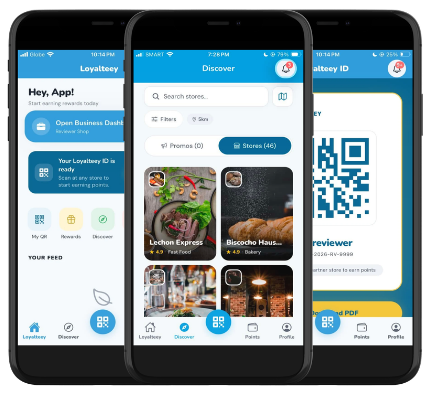
You sign up once. Open the app, tap Sign in with Google, and you have a Loyalteey ID — a QR code you'll find on your home tab. From then on, you don't sign up at each individual shop. Whether it's a café in Cebu, a barbershop in Pasig, or a salon in Iloilo, the same QR works.
Points stay with the store
This is the part that throws some people at first. Points you earn at Café A can only be redeemed at Café A. Why? Because pooling points across unrelated businesses isn't fair to the shops who paid the cost of giving you the reward. Per-store points means each business sets its own rewards, controls its own offers, and treats its own loyal customers the way it wants to treat them.
In practice, your Points tab shows a list of every shop you've earned at, with the current balance and what reward you're working toward at each one.
What you'll actually see in the app
- Home — quick summary of your points across all your stores, any unread offers, and your tier if a shop runs tiers.
- Discover — find participating shops near you. Tap into a business profile to see their rewards before you even visit.
- Loyalteey ID — your scannable QR. This is the screen you show at the counter.
- Points — every store wallet you have, with progress toward your next reward.
- Profile — your details, notification settings, and, if you also run a business, the switch into business mode.
A typical visit
You walk into a café. Order your usual. At the counter, you open the app, show your QR on the Loyalteey ID screen, and the barista scans it. Points land in your wallet for that café. If you've hit a reward threshold, the app tells you and the barista you can claim it now. That's it — no signup form, no email, no separate card.
The birthday thing
Some shops set up a birthday reward — a free drink, a discount, a small gift — that automatically unlocks on your birthday at that store. You don't have to remind them. The app does.
Is it safe to use?
Your QR is just an ID — it doesn't carry payment info or anything sensitive. Sign-in is through Google, so there's no separate password to manage. Each shop only sees the data they need to give you points and rewards: your loyalty ID, your visits, your tier. Nothing more.
The whole point of the Loyalteey app is to make loyalty feel like loyalty again: one ID, scanned at shops you actually visit, with rewards that come from the people you've been giving your business to. Download it, sign in, and the next time you see a Loyalteey QR poster, you'll know exactly what to do.